Viessmann / GoodWe installation
This contribution adds support for Viessmann Hybrid Inverter B1 devices to @wills106's SolaX Modbus Home Assistant custom component. The Viessmann inverter uses a GoodWe-compatible Modbus register map.
The implementation has been validated with a Viessmann HINV6.0-B1. Other Viessmann or GoodWe-derived models may use the same register map, but should be verified before being considered supported.
Requirements
- A supported Viessmann inverter with its RS485 interface available.
- A Waveshare RS485-to-Ethernet or RS485-to-Wi-Fi gateway that supports Modbus TCP to Modbus RTU conversion.
- Home Assistant with HACS installed.
- The SolaX Modbus custom component containing
plugin_viessmann.
Assign the Waveshare gateway a stable IP address, either statically or through
a DHCP reservation. Home Assistant must be able to reach this address on TCP
port 502.
RS485 wiring
Disconnect power before working on the inverter communication terminals and follow the inverter and gateway manuals.
Connect the inverter RS485 terminals to the Waveshare gateway:
| Inverter | Waveshare |
|---|---|
| RS485 A / D+ | A / D+ |
| RS485 B / D- | B / D- |
| GND, when required by the installation | GND |
If communication does not work, verify the A/B polarity before changing any software setting. Use termination resistors as required by the cable length, gateway and inverter documentation.
Configure the Waveshare gateway
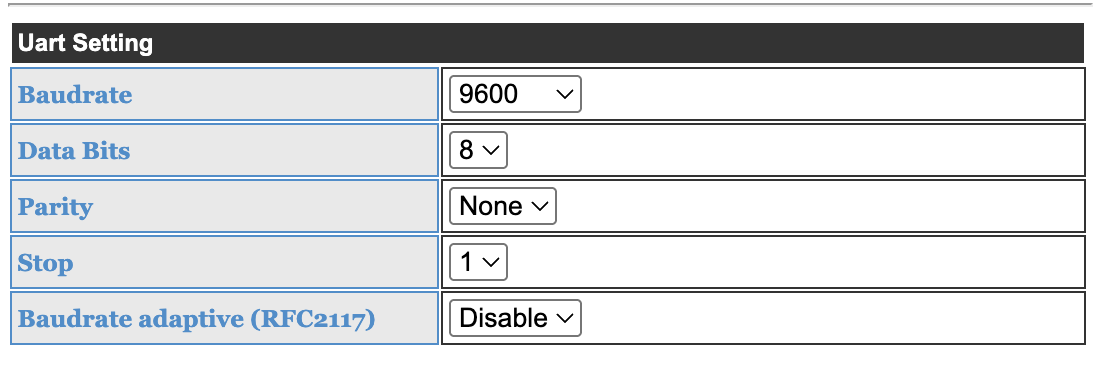
Open the Waveshare web interface and configure the UART with these values:
- Baud rate:
9600 - Data bits:
8 - Parity:
None - Stop bits:
1 - Baud rate adaptive / RFC2217:
Disable
Select station mode when the gateway must join an existing Wi-Fi network. Set
the data transfer mode to Modbus TCP <=> Modbus RTU, apply the settings and
restart the gateway if requested.
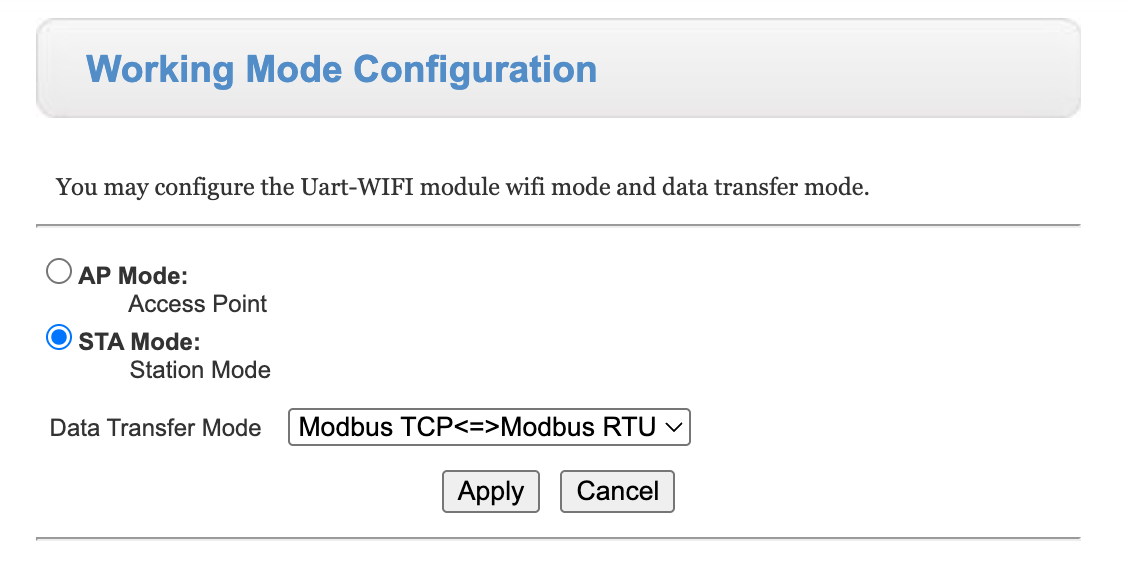
Do not use transparent mode for this setup. The gateway must translate standard Modbus TCP requests from Home Assistant into Modbus RTU requests for the inverter.
Install the custom component
Install SolaX Modbus through HACS using the normal integration installation instructions. Restart Home Assistant after installing or updating the custom component.
The viessmann plugin must appear in the inverter type list. If it does not,
confirm that custom_components/solax_modbus/plugin_viessmann.py is installed
and restart Home Assistant.
Configure Home Assistant
Add the SolaX Modbus integration and select:
- Interface:
TCP / Ethernet - Host: the IP address of the Waveshare gateway
- Port:
502 - Modbus TCP variant: standard TCP
- Inverter Modbus address:
247 - Inverter type:
viessmann - Default polling interval:
5seconds or slower - Medium polling interval:
15seconds - Fast polling interval:
15seconds
The inverter defaults to Modbus address 247. Use another value only if it has
been explicitly changed in the inverter configuration.
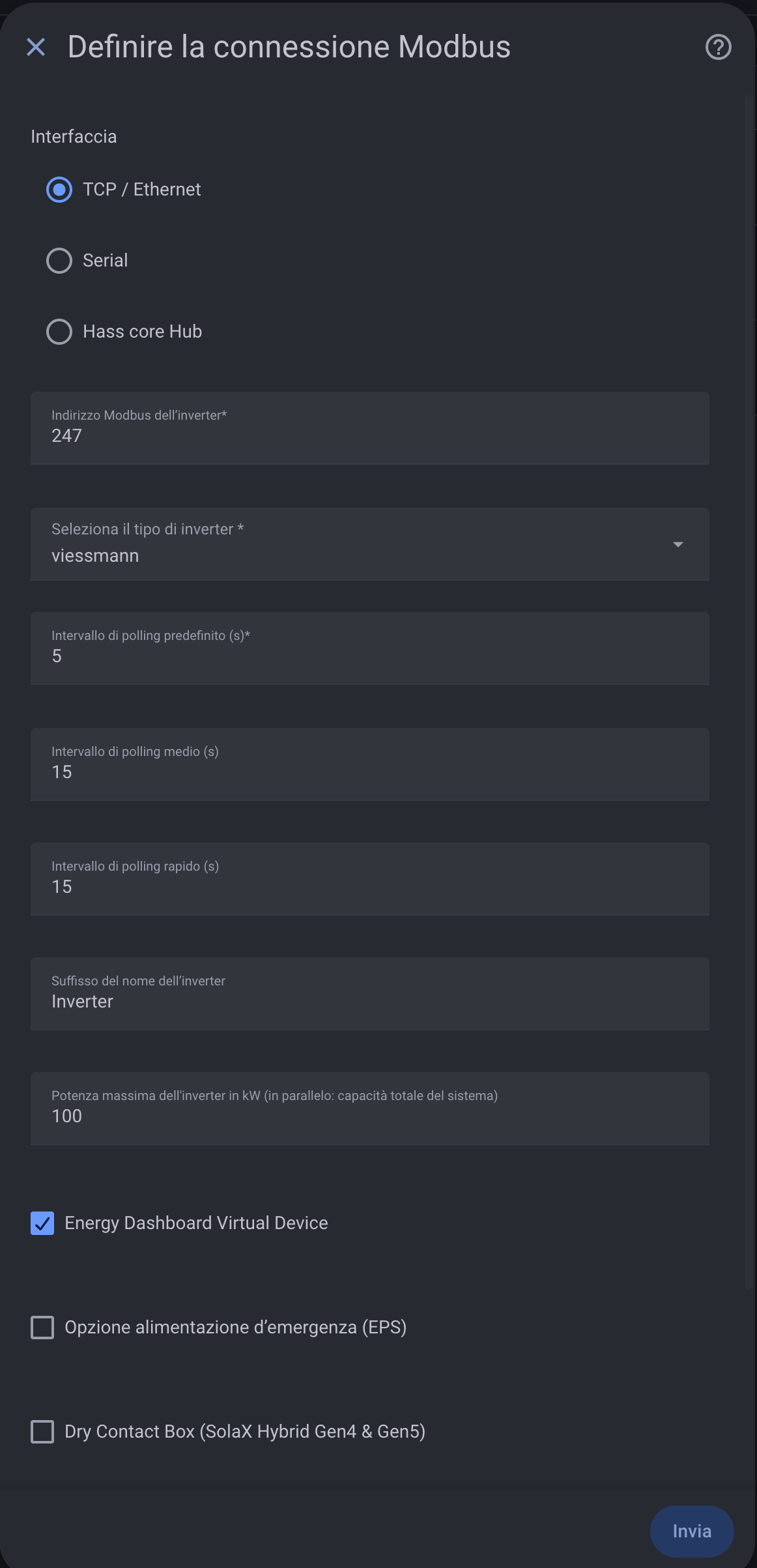
The Energy Dashboard virtual device can be enabled. EPS and SolaX-specific dry contact options are not required for the Viessmann plugin.
Verify the connection
After submitting the configuration, verify that the integration creates the Viessmann inverter device and that values such as PV power, grid power, battery state of charge and meter communication status are available.
The grid import and export energy totals are read from the physical meter registers. Daily grid import and export are calculated from those cumulative meter values and reset at local midnight.
If all entities remain unavailable:
- Confirm that Home Assistant can reach the Waveshare IP address and TCP port
502. - Confirm
9600 / 8 data bits / no parity / 1 stop bit. - Confirm
Modbus TCP <=> Modbus RTUmode. - Confirm Modbus address
247. - Check RS485 A/B polarity and meter communication status.