SolaX FAQ
How to find firmware version?
SolaX products (TODO - find out which, maybe only gen4?) provide a "firmware version", however it's stuck at the initial release version number. You need to get internal code.
- SolaX Gen3 Hybrid - "Firmware Version DSP" & "Firmware Version ARM" (Disabled by default)
- SolaX X3 Hybrid G4 -
27 07 26means firmware versions DSP V1.27 and ARM V1.26 - SolaX Pocket WiFi 3.0 - internal code
10.16means firmware version V3.010.16
Unable to change values (read only)
If you can read values, but unable to adjust select / number you need to change the select "Lock State" from "Locked" to "Unlocked". Might need performing again following a full Power Cycle.

How to connect PocketWiFi 3.0 to my Wi-Fi network?
You can use the SolaX cloud app or do it manually:
- Connect to the hotspot your dongle transmits TODO example.
- Navigate to http://5.8.8.8/ or http://192.168.10.10/ (test both, depends on firmware of the dongle, may change after an update). Username is
adminand default password your dongle SN (it's in the SSID and printed on the label) - You can use static IP or DHCP, static IP is recommended, as the IP won't change after your router reboot. Common mistake is that static IP is set in DHCP address range, don't do that! Refer to your router which IPs you can use. Fill in the details and submit.
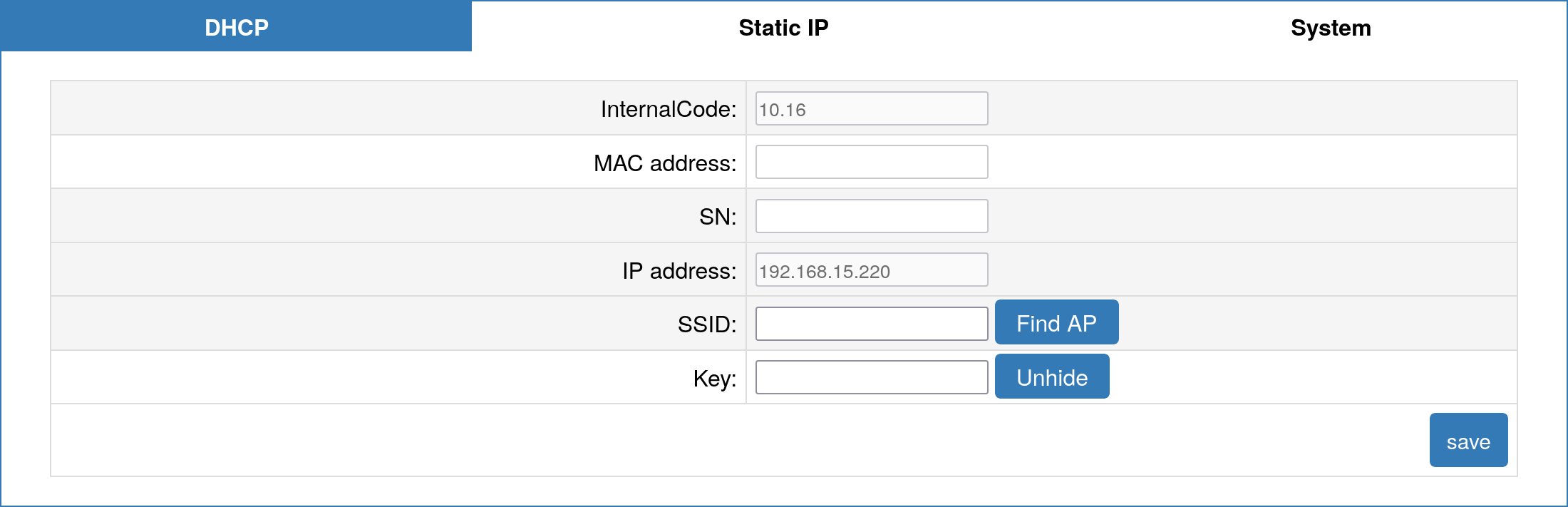
- Your device will connect to your Wi-Fi network, the device will remain reachable over its Wi-Fi hotspot and you can also connect by the IP you have set in your network.
I have lost my entities on restart / update using PocketWiFi 3.0
Pocket WiFi 3.0 with Firmware V3.004.03 and above is only officially supported. - Ensure Firmware is up-to-date (Contact SolaX) - Restart your rooter and then reload the integration in Home Assistant. - If that doesn't work you can unplug PocketWifi 3.0 for 30 seconds and plug it in again, then reload the integration.
I have multiple inverters in parallel mode (master-slave) and need help with configuration
Good news: The integration now has full support for parallel mode systems with active testing and validation!
For comprehensive guidance on parallel mode setup, configuration, and troubleshooting, see: SolaX Parallel Mode Documentation
Quick tips: - You can connect to individual inverters if they have separate LAN/WAN interfaces - PM (Parallel Mode) sensors appear when connecting to the master inverter - Remote control only works through the master inverter - Master automatically aggregates data from all inverters in parallel mode
For detailed setup instructions, sensor descriptions, and troubleshooting, refer to the parallel mode documentation above.
The maximum export limit is too low
For systems with a parallel mode setup, the default export limit can be too low.
To adapt this, there is a disabled entity called config_max_export. If you enable that entity, you can configure your own export limit (may require a restart).
The export_control_user limit is wrong by a factor 10
Some inverters behave differently compared to the other inverters of same model. To correct this, we have created a normally disabled control entity namded config_export_control_limit_readscale. Enablethis entity (please wait 30 seconds to let it appear) and set it to either 0.1, 1.0 or 10.0. The scaling should now be fine with one of these 3 scaling factors.
After remote control, inverter oscillates between import and export with SoC >= 98%
When finishing remote control (setting mode to Disabled) when the battery SoC is around 98% or higher, some inverters will oscillate between import and export, and keep doing so until the SoC drops to 97% or a large (>>1kW) load is applied. The cause of this behaviour is currently unknown. Refer to issue #1658.
As a workaround, the "Battery Charge Upper SOC" entity (number.solax_battery_charge_upper_soc) can be used to limit the SoC of the battery. Setting this to 97% prevents the undesirable behaviour at the expense of stopping the battery reaching full charge outside the remote control session.